
Releases & versioning
FolioOrb uses plain semantic versioning. The version lives in one
place — app/version.py — and flows into the app, the installers, and the release assets.
How a release is built
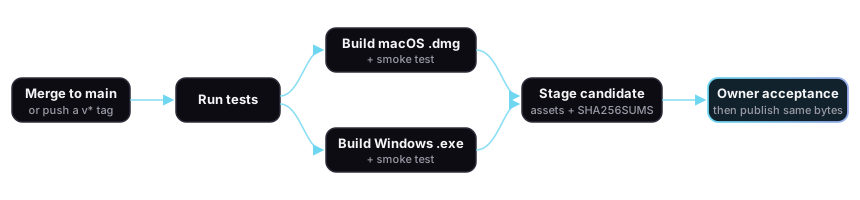
Section titled “How a release is built”Pushing a v* tag (or merging to main) triggers a single GitHub Actions workflow. It runs
the tests, builds both installers on their native runners, smoke-tests each frozen bundle,
and stages a checksummed candidate. With this workflow version, pushes only stage candidates.
An explicit manual publication run
waits for owner acceptance, then publishes the exact staged bytes without rebuilding.
If a build or acceptance gate fails, the previous release stays available.
Two channels
Section titled “Two channels”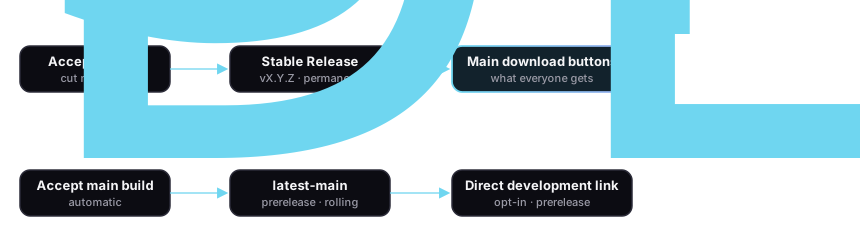
- Stable — published after acceptance of a version-tag candidate like
v5.16.1. This is what the website, README, and download buttons point to by default. A tag whose number doesn’t matchapp/version.pyfails the build on purpose, so assets can never be mislabeled. - latest-main — a single rolling prerelease, updated only after acceptance of a candidate from
main. Always marked prerelease, so it never becomes the “latest” download by accident. Offered under a direct Development build link for anyone who wants to test the newest changes.
Assets in current v5 releases
Section titled “Assets in current v5 releases”| Asset | Description |
|---|---|
FolioOrb-macOS-arm64-v5.16.1.dmg |
macOS Apple Silicon installer |
FolioOrb-Windows-x64-v5.16.1-Setup.exe |
Windows per-user installer |
SHA256SUMS.txt |
Checksums for both installers — see verifying downloads |
New accepted candidates also publish candidate.json, recording source SHA, workflow identity,
and installer hashes. Its digest is recorded in the staging summary; it is not an installer
and is not listed in SHA256SUMS.txt.
Development builds use the same names with v5.16.1 replaced by main-<short-sha>.
Code-signing roadmap
Section titled “Code-signing roadmap”Builds are currently unsigned (macOS uses only PyInstaller’s ad-hoc signature). We don’t claim otherwise anywhere — the install guides show the exact warnings you’ll see. The path forward, in order:
| Phase | Status | Effect |
|---|---|---|
| 1 · Unsigned + checksums | Now | Works everywhere; system warnings on first launch |
| 2 · Apple Developer ID signing | Activation pending | Establishes publisher identity; Gatekeeper can still warn before notarization |
| 3 · macOS notarization | Readiness checked in; activation pending | Clears the unidentified-developer block after acceptance; the normal first-open confirmation remains |
| 4 · Windows code signing | Readiness checked in; activation pending | Establishes publisher identity; SmartScreen reputation warnings can still appear |
Phase 2’s fail-closed workflow support is checked in, but no public release is described as
Developer ID signed until the certificate is configured and the exact downloaded app and DMG
pass signature verification. The documented rehearsal keeps publish=false; a manual run can
request publication only when publish=true is explicitly selected. The owner must then
verify and accept that same run’s staged installers at the protected publication gate.
A previous rehearsal does not approve a freshly rebuilt candidate. See the
release acceptance checklist.
Phase 3’s build-only rehearsal support is also checked in, but remains dormant until
Developer ID signing is active in the same run and an App Store Connect API credential is
configured. It submits and staples the app before assembling the DMG, then separately
submits and staples the signed DMG. Both artifacts must receive Apple’s Accepted result
and pass Gatekeeper assessment. Notarization remains a separate later gate until that exact
downloaded DMG is independently accepted and the public-verification switch is enabled.
Phase 4 follows the same evidence boundary on Windows. A build-only rehearsal uses
short-lived GitHub OIDC authentication to sign both the frozen executable and final
installer with Azure Artifact Signing, requires SHA-256 RFC 3161 timestamps, and checks
the exact expected publisher subject before upload. Public downloads remain described as
unsigned until the downloaded installer and its installed executable pass independent
Authenticode verification and the Windows public-verification switch is enabled.