
Saved places, packing, and manual plans
Voyalier keeps confirmed evidence and your own plan in separate lanes. A saved recommendation, checklist item, or typed museum visit is useful—but it is not a reservation and never changes logistics readiness.
Save a place
Section titled “Save a place”Download a city pack, set the food/culture/nature/nightlife/shopping weights, choose Save interests when you want those weights to persist, and then choose Get recommendations. Select Save place to keep a result’s name, coordinates, reasons, source, and license, then add your own private notes.
Removing the source pack does not remove the shortlist. Voyalier marks the pack as unavailable while preserving the provenance snapshot. Add to plan prefills the same traveler-authored activity form with the saved place and its coordinates; review the form and submit it before anything enters the plan.
Opening the consent-gated map also plots this saved shortlist before unsaved recommendations. Vermilion and indigo markers have matching text labels, and an expandable place register repeats every point without relying on color or the canvas. A saved/recommended duplicate is shown once as saved.
Build the packing checklist
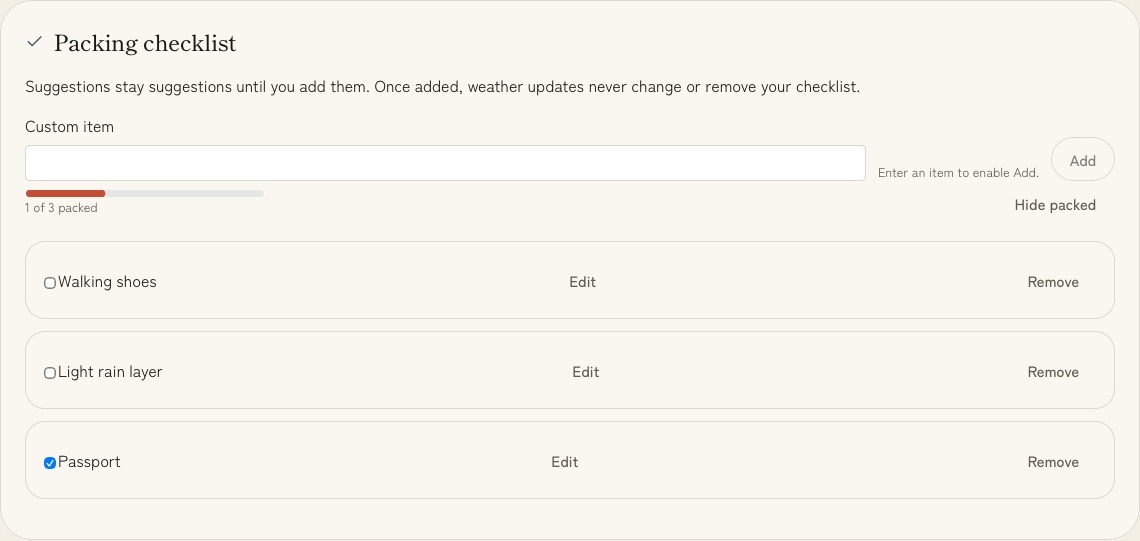
Section titled “Build the packing checklist”Packing suggestions are derived from the trip and stored weather evidence. They never enter the checklist silently: choose Add for a suggestion you want, or type a custom item. Check, uncheck, or remove items as the trip changes. Refreshing weather does not rewrite traveler-owned checklist state. Accepted and custom items can also be renamed; unchecked items stay above completed ones. The custom Add action stays disabled until you enter an item, so an empty click cannot look like a lost change.
Once the checklist has accepted items, a progress line counts checked items out of that total. Suggestions do not enter the denominator until you choose Add. Hide packed removes completed rows from the current view only; it does not update or delete them, and Show packed always restores them.
Add an activity, rail leg, or transfer
Section titled “Add an activity, rail leg, or transfer”Enter a title and, optionally, a location, floating local start/end time, and private notes. Items can be edited or removed. If two timed items literally overlap, Voyalier shows a planning notice; the notice does not become a booking conflict or affect readiness. A name is required: submitting a blank form shows the requirement beside the field and moves keyboard focus there.
Scheduled manual items can appear in Today, the printable brief, and .ics
calendar export. The export projection has fields only for title, kind,
location, and times, so private notes cannot enter it.
Search the workspace
Section titled “Search the workspace”Inside one trip, Find in this trip scans imported documents, confirmed facts, and saved research. Results keep those source kinds distinct, and Show source focuses the exact local row without fetching a page, reopening a sealed document body, or putting the query or source identifier in the URL. If the row no longer exists, Voyalier opens its section and says that the exact source is unavailable.
Use Search workspace from the top bar to search every trip’s imported documents, confirmed facts, trip notes, saved places, manual plans, and saved research resources. Each result names its trip and source kind, so a resource you filed to read never arrives looking like a confirmed fact. For a resource, your note, your tags, and any page text you chose to fetch are all searched.
Choosing a workspace result returns to the exact local fact, plan item, saved place, notes panel, document, or saved-reading row. If that local panel is still loading, Voyalier says the handoff remains active and completes it when ready. A record removed after search falls back to its owning heading with an honest notice; a storage error remains a storage error. Editing the query immediately supersedes older results and failures, including during the short debounce.
Two things stay out. Pending extraction candidates remain out of search until you review them, and AI chat transcripts are excluded permanently. Search is a bounded local scan: no query or index leaves the device.
Return after a reload
Section titled “Return after a reload”While a trip is open, reloading returns to that trip and preserves a selected Plan, Prepare, Discover, or AI section. Voyalier keeps only the active trip id in browser session storage for this re-entry hint—never the trip’s content, evidence, notes, or search text. Choosing All trips clears the hint and any stale section link.
Search and Settings are temporary detours rather than new owners of the trip. In-app Back and browser Back/Forward unwind nested detours in order, restore the private Search query attached to that history entry, return to the prior trip section, and focus the restored page heading. A direct Search or Settings URL has no app-owned predecessor, so its Back action falls safely to All Trips. Individual panel names, search queries, and exact record ids remain out of the durable URL.
Language and source transparency
Section titled “Language and source transparency”Settings includes Language (System, English, or Español) and Data sources & licenses. A language change applies immediately and stays in local browser storage. Catalog-backed views have English and Spanish copy; the concierge cockpit and some trip-idea controls currently remain English. The concierge region marks that English copy for assistive technology. Complete screen translation remains deferred. The topbar and Settings theme controls share one Light/System/Dark preference, so changing either updates both immediately. The 20-entry source register groups built-in, consent-fetched, offline-download, and optional-AI inputs and names each authority and license boundary. It does not merge different sources into a trust score.