
Study a feature
Land first, then choose depth
Section titled “Land first, then choose depth”Selecting a function or class opens a compact landing brief before the longer study surface. When the parser has role evidence, Easy explains that purpose in plain language and Expert names the exact rule. When it does not, both say the purpose is unknown rather than inferring one from a name. Expert also adds the exact kind, source span, structural summary, and certainty language. Both show inbound and outbound graph connections, so the next jump is visible without requiring narration. The register can change in place.
Feature journey next
Section titled “Feature journey next”Open a structure and Study answers the question that a source excerpt alone cannot: how does this project reach here from Home? The journey is built locally from the same graph as the Galaxy and Map. It does not ask a model to guess an architecture.
A complete journey can include four kinds of place:
- Home — the parser-ranked or explicitly selected project start.
- File corridor — certain imports between project files.
- Application surface — a parser-observed app entry, route handler, or UI renderer.
- Runtime path — certain calls that reach the selected structure.
Each step cites the declaration it represents. When the application role was observed somewhere else—for example, an Express route registered in one file with a handler declared in another—Expert mode shows both the observation and the declaration. For a selected module, the route ends at the file; runtime is marked not applicable rather than invented.
The route is canonical and deterministic: only directed, certain import and call evidence can complete it. Folder membership can explain context, but it cannot bridge a gap.
Where proof stops
Section titled “Where proof stops”If the graph cannot prove the next hop, the journey stops at a visible proof break. Below that break, Codemble may show a bounded possible frontier only when the possible relationship can still lead toward the selected target.
That frontier is a reading lead, not a continuation of the proven route. It
keeps its possible label, cites the observed relationship and target
declaration, and never changes the completion state. Partial files and a missing
Home are named as breaks too.
Easy and Expert share one place
Section titled “Easy and Expert share one place”| Easy | Expert | |
|---|---|---|
| Journey | Ordered overview and one current step | The same overview and current step |
| Step detail | Plain purpose, exact citation, Back and Next | Parser rule and observation/declaration evidence for that same step |
| Selected feature facts | Impact and Connections in one disclosure | The same Impact and Connections, plus bounded verification candidates |
| Mode switch | Keeps the current step selected | Keeps the current step selected |
| Truth | Certain route, then a visible possible frontier | Exactly the same route and frontier |
The current step is identified by its route content, not its position on a particular screen. Switching modes therefore does not restart the lesson. If a file change shortens the route, Study keeps the same step when it still exists and otherwise returns to the first proven step.
There is deliberately no separate journey XP, completion score, or proof record. Charting, checks, and understood state retain their existing meanings.
Impact and Connections, once
Section titled “Impact and Connections, once”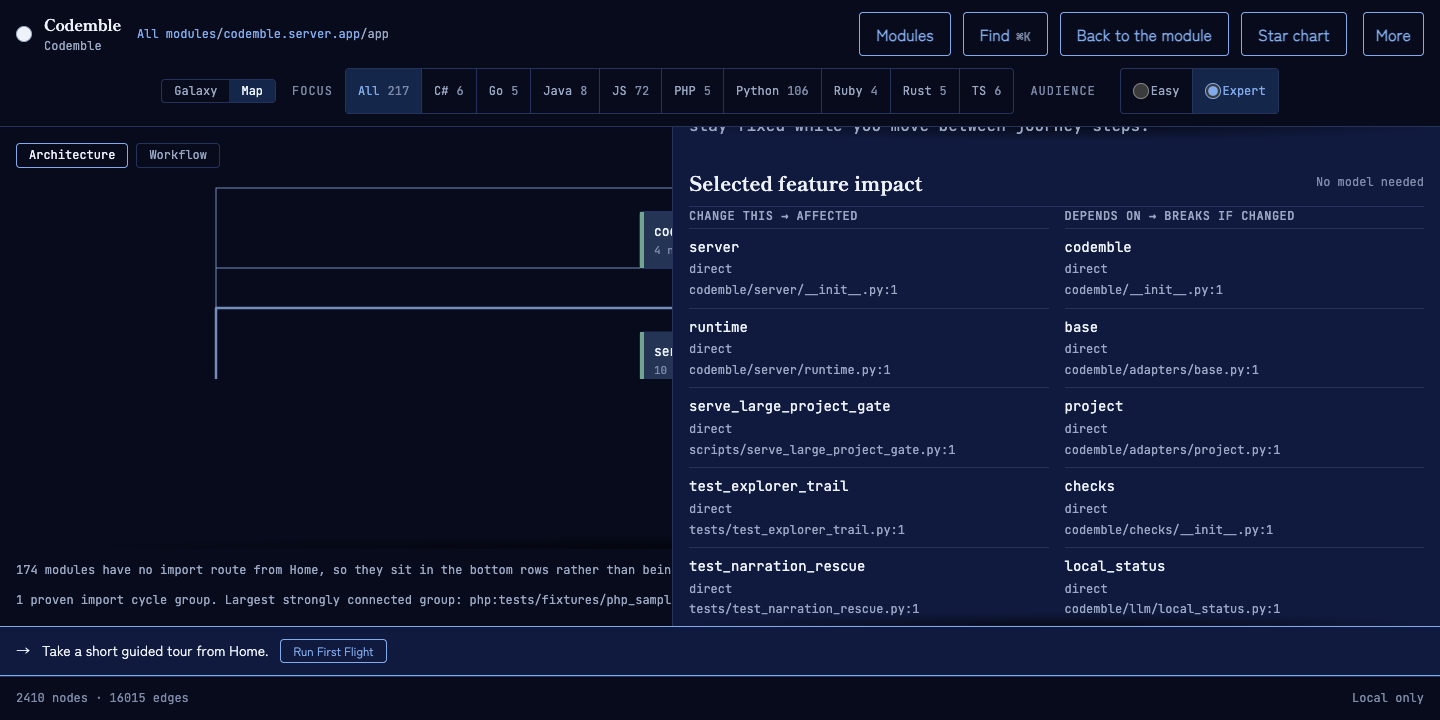
The journey’s details disclosure contains graph facts about the selected feature. These facts stay fixed as you move between route steps; they are not claims about whichever step happens to be current:
- Impact answers what can feel a change to the selected structure and what that structure depends on. It is a bounded graph walk; a chain containing one unproven edge stays possible for its whole length.
- Connections lists the selected structure’s parser-observed inbound and outbound relationships, their certainty, and real source locations.
Expert mode can also list connected test-role nodes found inside that impact radius. These are verification candidates, not proof that the test exercises the feature and never a claim that any test passed. Codemble does not run the project or invent a command.
An empty Impact side is bounded too. “No dependents found in this parser map” means exactly that; it does not claim that reflection, dynamic imports, framework wiring, or runtime behavior cannot reach the structure.
Source, Lens, narration, and checks
Section titled “Source, Lens, narration, and checks”The rest of Study stays available below the journey:
- the parser-owned structural summary and exact numbered source;
- language Lens notes attached to parser-detected constructs;
- optional bounded narration from the provider you configured; and
- graph-derived checks, which remain the only way to light a system amber.
Every item except narration is local and model-free. Opening Read source takes you directly to the excerpt. Opening Study by any other route starts at the journey, with its position, current citation, and Back/Next controls kept reachable even at 320px reflow widths.
Study reads one byte snapshot, verifies it against the parser’s file hash, and decodes those same bytes. A changed, replaced, missing, or unsafe-to-decode file stops Study before cache or provider use and asks you to reopen the folder. Changing Easy/Expert remains optimistic for a responsive control, but a refused save reconciles to the server-confirmed register and stays visible beside the control. An unconfirmed two-file save asks for a reload rather than asserting which register reached disk.
No key? Nothing important is missing
Section titled “No key? Nothing important is missing”Without a provider key, the journey, Impact, Connections, source, Lens, and checks still work. For local narration too:
ollama pull gemma4:12bexport CODEMBLE_PROVIDER=ollamaexport CODEMBLE_OLLAMA_MODEL=gemma4:12bNarration may describe only the bounded excerpt it received. An invented identifier or out-of-range citation is withheld; network, provider, timeout, and formatting failures are reported as their actual failure class.
Partial parses
Section titled “Partial parses”If a file has a syntax error, Codemble keeps the file visible and refuses to invent structure inside it. The journey names the resulting break, narration is disabled for that file, and the structural summary states why.