The galaxy
Your code, mapped honestly
Section titled “Your code, mapped honestly”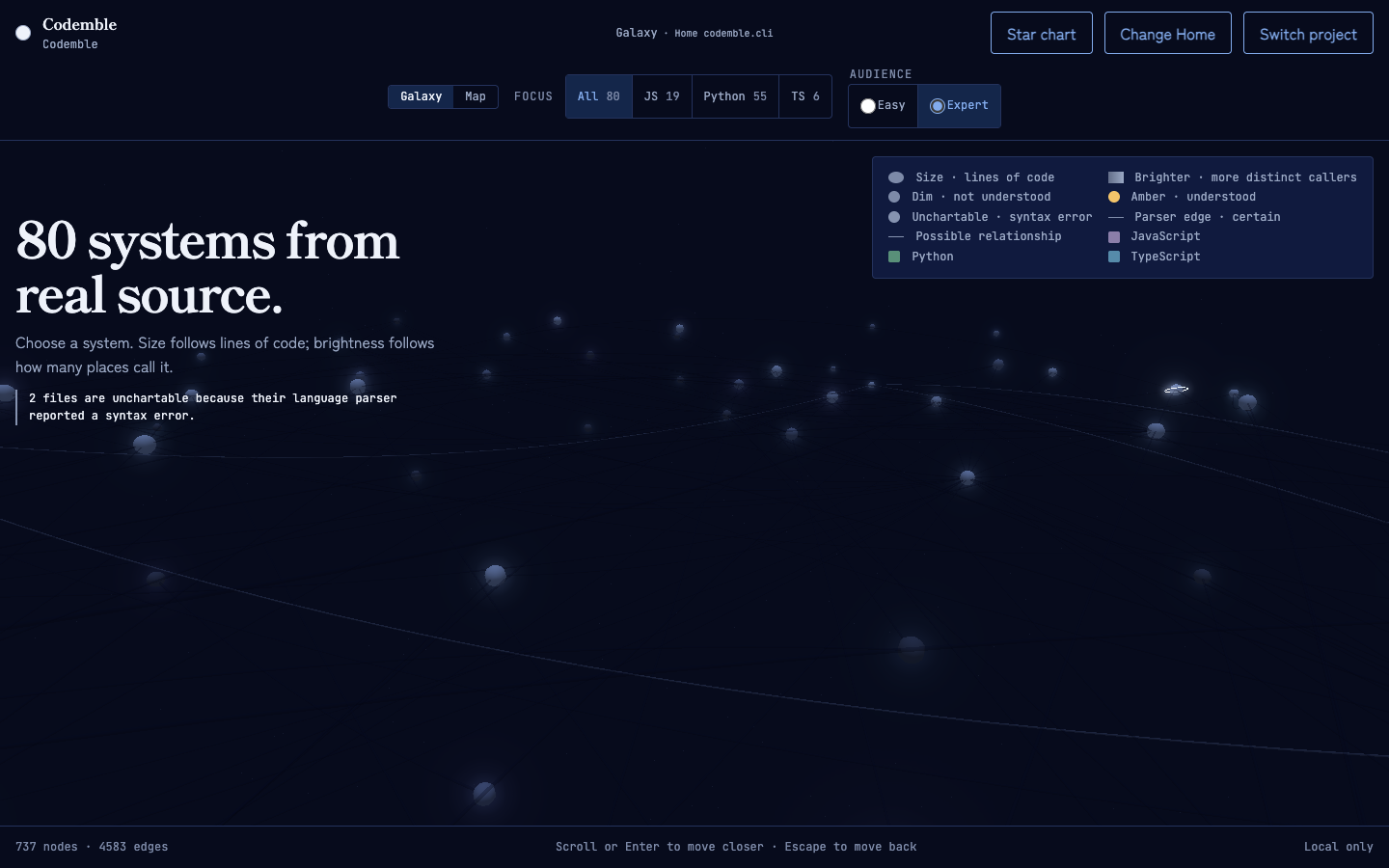
The galaxy’s structure is not an artist’s impression. Every semantic visual property below comes from parsed code; spiral dust, distant stars, nebula variation, reticle glass, and the optical vignette are seeded scenery and add no independent meaning:
| Visual | Meaning |
|---|---|
| Star system | One source module |
| Planet | A function or class |
| Route between systems | An import — a proven route inside one coloured community inherits a restrained tint; bridges stay neutral |
| Edge between planets | A call — solid when proven, dashed and labeled “possible call” when not |
| Size | Lines of code |
| Brightness and glow | How many distinct places call it (centrality) |
| Colour family | Import community — related modules and their proven internal routes share a hue |
| Nebula tint | Language |
| Lit amber / no amber | Understood / not yet; Explore still keeps unproved systems colourful and readable |
| Drifting particles | A route the parser proved; possible routes stay still |
| Orbit guide | Solid = layer containing certain calls; call roots are named separately; dashed = no certain call in that placement |
| Routes drawn around a system | You have flown there; the system is charted |
Every system is drawn, coloured, named, and visibly luminous from the very first Explore frame, whether or not you have been near it. Hovering one system does not black out the rest of the project. Guided Learning may soften distant context to clarify the current route, but it never removes parser-owned nodes. What fills in as you explore is the web of import routes between systems — drawing all of them at once is what makes a large project unreadable — along with the frame the camera opens on, so a first run starts among the modules closest to Home rather than staring at the whole disc from far enough away to read none of it.
Hover a star and it names itself and reports how many structures use it and how many it uses. A count of zero is left out rather than printed.
Nothing that is merely busy can outshine something you understand: the unlit brightness ramp stops below the amber a lit star uses. Brightness counts the distinct places that call a structure, not how many call sites they contain — a helper hammered in one loop is not more depended-on than a shared utility.
Hue answers a different question: which part of the project is this? The parser proves import communities — groups of modules that import each other — and the project’s eight largest communities each wear one of eight traditional Japanese colours (seiji, fuji, koke, asagi, toki, umenezumi, wakatake, kikyō). Real projects have more communities than that — this one has thirty-eight — so the rest carry no hue at all and keep the plain brightness ramp. That is deliberate: a colour shared by two unrelated groups would answer “which part of the project is this?” wrongly, and no hue honestly says “not one of this project’s main groups”. Assignment is by size, ties broken by id, so the same code always yields the same sky. Every hue is lightness-capped at the unlit ceiling, so a lit amber star remains the brightest object by a wide margin, and the amber band itself is excluded from the wheel so no community can ever read as “understood”. Inside a system its planets inherit the family hue, with lightness still answering callers.
Enter a solar system
Section titled “Enter a solar system”Selecting a module changes scale without changing truth. Its safe module anchor becomes the system Sun: a central language-coloured star that makes the file itself unmistakable. Functions and classes become named planets in call orbits. Inner placement distinguishes direct certain calls from call roots, which can share the first ring without claiming an edge. The outer drift states that no proven path was found instead of inventing one.
World character follows the parser-owned language. Python, JavaScript, TypeScript, Go, Java, Rust, C#, Ruby, and PHP each receive a deterministic mix of surface terrain, mineral bands, shimmer, atmospheric colour, axial tilt, and rotation. These are variations of a known language fact, not inferred runtime roles or quality scores. Reduced-motion mode removes the rotation and shimmer without hiding the worlds.
The Nearby systems console lists parser-owned module imports that enter or leave the selected system. Certain routes remain solid, possible routes remain explicitly possible, and each named destination can open its own solar system. This is the same graph as the Galaxy route mesh, presented as a readable continuation rather than a new relationship.
The route cue is intentionally quiet. A proven import whose two systems belong to the same coloured community picks up only part of that family’s hue, making a corridor traceable without turning the graph into a rainbow. A route between communities stays in neutral route ink. A possible import keeps its own dashed, neutral treatment even when its endpoints share a family: colour is a grouping hint, never evidence that upgrades certainty. The Key states all three cases in words and line style, so colour is never the only way to read them.
While a large project loads
Section titled “While a large project loads”Parsing runs on a background thread, so the browser stays responsive. The loading screen names the stage it is in — finding files, reading each file, connecting imports and calls, building checks, placing the galaxy — with a real file count while files are being read. The stages after that advance by naming the real sub-step running rather than a count, because none of them has a per-file total to report honestly. If the parse fails, you land back on the picker with the parser’s own error message and a one-click retry for the same folder — no need to restart Codemble. Cancelling works the same way: it returns you to the picker and stops the parse at the next file boundary.
Game-level scenery, evidence-level restraint
Section titled “Game-level scenery, evidence-level restraint”The sky is lit rather than drawn. Every star carries a halo generated on a canvas at runtime, and a bloom pass is tuned so the amber of an understood system blooms hard while the unlit ramp barely registers — brightness in this sky is a claim, so it is spent where a claim exists.
The background starfield is explicitly decoration. It is generated from a seed derived from your project’s own file hashes, so the same code always produces the same spiral disc, core, dust lanes, distant star shells, and nebula family. It never changes a node, route, label, certainty, visit, check, or progress state. The ground carries its own ambient depth rather than matching the app’s panels, while a lit amber star remains the brightest semantic object by a wide margin.
At galaxy level, every system sits in a faint language-tinted nebula — one hue for each of the nine languages Codemble reads. The nine are held at the same lightness as each other, so no language reads as more important than another, and all of them stay clear of the amber band, which belongs to understanding alone. A file in a language Codemble does not read is not in the graph at all, so there is no system to tint; the galaxy states how many such files it saw rather than drawing a colourless one.
For projects above 900 supported source files, Codemble yields for 650 ms before constructing the 3D sky and names the preparation on screen. That short window keeps the first-run launch responsive: if the complete Canvas Map takes over, the pending WebGL work is cancelled instead of building a galaxy the learner will not see. Ordinary projects still enter the sky immediately.
When you pass a region’s checks, the next time you are at galaxy level that
system plays a 1.2-second nebula dawn: amber washes out across its halo and
fog, then recedes. The lit state is already saved before the animation runs, so
it celebrates a fact rather than delivering one. Under
prefers-reduced-motion the dawn is skipped entirely and you get the finished
lit state — not a faster animation, none at all.
Keyboard focus carries a visible reticle in the 3D scene as well as a live text readout. The active system and its one-hop neighbours on the currently drawn route mesh win the label budget, and the selection persists while focus moves into the Key, so arrow-key exploration does not collapse into an unnamed sky. Pointer exit clears transient hover emphasis instead of leaving a stale constellation behind.
The trail you leave by exploring
Section titled “The trail you leave by exploring”Flying to a system charts it. Its import routes stay drawn from then on, the orientation line counts it among the charted systems, and the star chart records it under Systems explored. This survives restarts, saved beside the rest of your progress.
Charting is deliberately not lighting. It is earned by travel and says only that you went there; the amber of an understood system is earned by answering questions drawn from your own code. Keeping them apart is the point — a map that filled in as a reward for moving around would eventually claim you understood a project you had only toured. Opening a module from the workflow tree, the connections list, or the impact panel charts it too, exactly as flying to it does.
Clearing a project’s progress clears both: the understood regions and the explored trail.
Choose your launch
Section titled “Choose your launch”On a first run, Choose your launch separates two intentions that used to be stacked into one onboarding path. Explore freely opens the complete Galaxy with coach marks dismissed. Take a first flight saves the selected Easy or Expert register, enters the Galaxy, and tours Home plus the modules Home directly imports. If Home needs calibration, the guided intent waits for the learner’s selection and begins afterward. The choice changes presentation and navigation only; it never changes the graph, source, checks, or progress.
The launch control is deliberately not a difficulty lock. Easy and Expert stay available in the header and again on every landing brief, so a learner can begin casually and ask for exact parser evidence when curiosity demands it.
Take a First Flight
Section titled “Take a First Flight”When Codemble has a Home, the guidance strip offers a short First Flight. It lands at Home first, then visits only the modules Home directly imports through routes the parser proved, ordered deterministically by their graph centrality and id. The stop list is capped at six systems in total, so it remains an orientation rather than turning into an exhaustive walkthrough. Each non-Home stop is related directly to Home; the order does not claim an import or call between consecutive stops.
Each stop names the system, language, and how many galaxy import routes lead in and out. Land and learn opens the first complete parser-owned declaration in source order (or the safe module anchor when no complete inner declaration exists, including for a partially parsed file). The landing brief then exposes Prove understanding, continuing through the same graph-derived checks used everywhere else. Next, Back, and Exit are keyboard reachable. Escape exits through the same ordered dismissal path as the app’s other transient surfaces and returns focus to the First Flight control. Every landing uses the normal travel path, so a toured system is charted exactly as one reached by clicking a star. With reduced motion enabled, the camera jump-cuts between stops instead of animating.
First Flight has no completion badge or saved state. Landing and checks use the ordinary Study and check pipeline, not a second tutorial progression. The flight can be run again at any time, and if the parser has not resolved a Home the control is absent rather than building a route around a guess. Easy and Expert change the language of the guidance, not the systems visited or the facts shown.
Land on a world
Section titled “Land on a world”Selecting a structure moves the camera along the existing bounded travel path and opens a Landing brief. When role evidence exists, Easy explains that parser-known purpose in plain language and Expert names the exact rule. Without role evidence, both explicitly say purpose is unknown. Expert also adds the exact kind, source span, parser summary, and certainty language. Both registers show real inbound and outbound graph connections; an unresolved relationship remains a visible possible call.
From the landing, continue along a connection, read the real source, inspect Impact, or prove understanding. Changing Easy/Expert updates the explanation in place rather than sending the learner back to launch. The textured terrain, mineral bands, atmosphere shell, tilt, and slow rotation are deterministic world-building keyed by node identity. They encode no language fact or progress claim; orbit, edges, names, source, and amber retain those jobs.
On a compact screen, that landing explanation stays in the first viewport. Inbound, outbound, and possible-connection counts name what continues below; opening the disclosure reveals the complete connection facts, and the journey, source, Impact, and checks remain reachable in normal document order.
Bounded orbit, not free flight
Section titled “Bounded orbit, not free flight”Drag to orbit the current subject and use the wheel to zoom. Panning is off, distance and polar angle are clamped for each level, and clicking a node moves between galaxy, system, and study with a scripted transition. The parser owns every node position, so nodes do not drag away from the graph. Reading never happens “in space”: the study panel takes the foreground, and the sky behind it recedes to the structure you are reading and its connections.
The camera also frames around whatever is sitting on the canvas. Inside a system, the panel naming the module floats over the sky, and a structure the camera parked beneath its button used to be unclickable — the click reached the button. Because the parser owns where a structure is, the camera is what moves: it aims into the largest part of the canvas no control covers, and only stands further back if the system no longer fits there. The panel’s text is not reserved, only its controls: prose over a star costs nothing, because the star stays clickable and stays visible around the words.
Keyboard: arrow keys move the selection between siblings and Enter opens the selected one, at every level including study, where it re-targets the panel. Escape steps back a level — on the Map as well as in the Galaxy — and closes the star chart, returning focus to the control that opened it.
On a wide screen the header keeps Modules, Find, the level exit and Star chart on screen, and three occasional controls — Share preview, Change Home, and Switch project — sit behind a More disclosure. Seven permanent buttons need more width than a header can give them without wrapping to a second row, and the stage pays for that in height, so the three you reach least often step aside. Below that, every secondary control lives behind a single Menu button instead, because a wide header that has to wrap costs more height than the compact one it replaces. Opening either disclosure never moves the stage.
At narrow widths guidance also occupies its own row below the stage, and Study becomes a full-stage scrolling sheet. The map/canvas and the local-only status remain in the viewport instead of being squeezed behind controls. Opening Modules, Find, the Star chart or a region’s checks moves keyboard focus into the new surface; closing it returns focus to the invoking action or to the visible Menu or More button. Escape closes an open disclosure without also stepping back a level. Within the checks panel, answering keeps focus on the result rather than dropping it back to the page.
Two layers, one truth
Section titled “Two layers, one truth”The header switches between the 3D Galaxy and a flat Map. The Map has two tabs: Architecture lays your modules out by folder and by how far they sit from Home along import routes, and Workflow walks the call tree from your entrypoint. Both layouts are computed by the same parser-backed graph the galaxy draws — the map cannot show you a relationship the galaxy does not have. Modules with no import route from Home are never guessed into position: they remain in complete bottom rows, and the note says exactly how many. Every module stays in the canvas scene, Finder, and keyboard order even when test fixtures outnumber the connected source. Clicking anything in either layer opens the same study panel, and a lit system is amber in both. Architecture boxes carry their community’s colour family and a language stripe, and routes are drawn in their own ink so a connection never disappears beside a box border.
Every route on the Architecture layer approaches its destination from above and turns down into it, so its arrowhead points into the box rather than lying along the border, and the short vertical stub above each arrow shows the line you can follow back to the source. Routes that have to travel — a cycle, a backward edge, anything skipping a layer — run out to a corridor beside the drawing and return the same way, so a long connection is still traceable end to end.
When proven imports form a cycle, the Map states it in a full prose line beneath the drawing and names every module in the largest cycle. Easy mode calls it a file circle and says the files bring each other in; Expert mode uses the import cycle term. This fact comes from graph schema 10, not from SVG geometry, and a possible-only loop is never promoted into the report. The same cycle line is carried into the star-chart project overview and its Markdown export.
The Map opens at readable 100% on compact screens and centres Home or the selected target instead of shrinking every box into a whole-diagram thumbnail. Fit gives the overview: on a wide drawing it fits the whole shape, and on a tall one it fits the width so layers stay readable while the height scrolls, instead of landing on an unreadable thumbnail. The percentage button returns to 100%. Codemble remembers zoom and pan through fresh Map data and layer switches, re-centres on your focus when a window resize would leave it staring at empty space, and clears renderer-only view state when you switch projects. The Map needs no WebGL, so it still works where the galaxy cannot draw.
A region = one star system
Section titled “A region = one star system”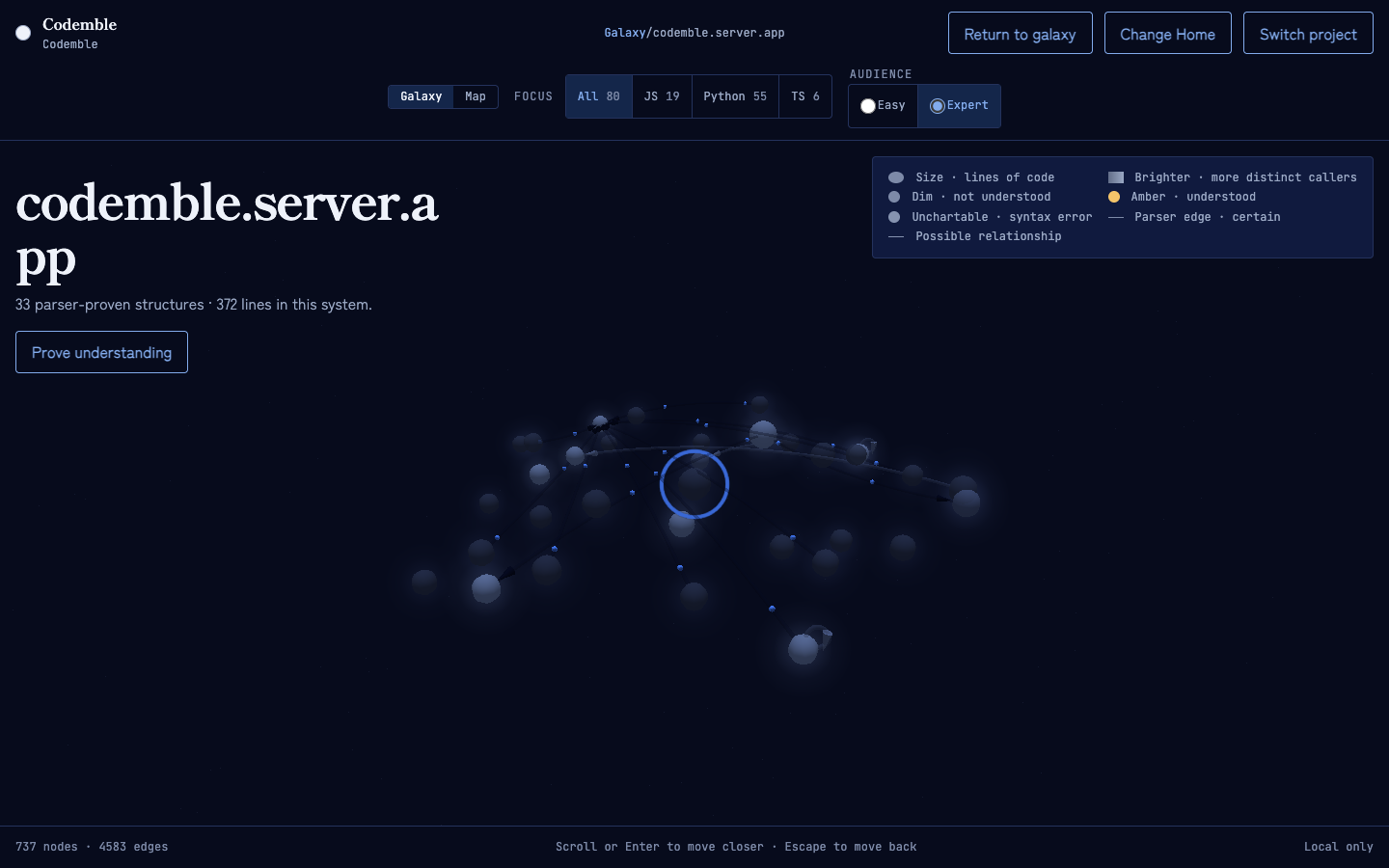
A region is one module — the unit of checks, illumination, and progress. Change a file and only its region goes dim again; the rest of your sky stays lit. Its members orbit in labelled call layers derived from certain calls. Solid guides mark proven layers; a cyclic or otherwise unreached structure stays visible behind a dashed No proven path guide rather than receiving a fabricated depth. A Prove understanding button opens that region’s checks.
Focus a mixed sky without changing it
Section titled “Focus a mixed sky without changing it”When a project contains more than one supported language, the top rail offers an All button plus one button per language actually present, each with its system count — JavaScript and TypeScript are shortened to JS and TS, and the rest are named in full. Focus filters the current view, its routes, partial-file notices, and star-chart rows. It does not reparse code, move systems, erase progress, or hide external and unresolved relationships originating from the focused language.
Switching focus away from the system you are viewing returns safely to the focused galaxy. Following a real relationship into another supported language switches focus to that target instead of creating a dead end.
Reading the connections
Section titled “Reading the connections”Below the galaxy level, every edge carries an arrowhead pointing from caller to callee. Hover an edge for its tooltip: the two structures, whether it is an import or a call, whether the parser is certain, and the line it was seen on. A relationship the parser could not prove reads “possible call” or “possible import”, and is drawn dashed in the uncertainty colour — never as fact. The dash matters as much as the colour: it survives colour-blindness, a dim screen and a greyscale screenshot, and both layers now break an unproven line the same way rather than the galaxy relying on hue alone.
Hover or select a structure and it and its edges take the interaction blue while its neighbours hold their own colour and everything else recedes. In the study level the selected structure stays highlighted with its connections, so the panel and the sky agree about what you are reading. In Easy mode the unrelated edges are hidden outright rather than faded.
Drifting particles travel a call edge the parser proved, below the galaxy level
where call edges exist. A possible call stays still, so motion can never imply
proof — and under prefers-reduced-motion nothing drifts at all.
Certain connections are drawn in a dedicated route ink on both layers, distinct from panel rules and box borders, and a possible relationship is deliberately the more visible of the two — an unproven claim should never be the one you miss. The legend in the corner names every encoding: size, brightness, amber for understood, a corner-flag mark for syntax-error files, the colour-family row, a row for each language present, and certain versus possible relationships — and every swatch is drawn in the same ink the sky actually uses, read from the same table, so the key and the sky cannot drift apart. In Easy mode the legend says the same things in plain language.
Previewing a share, switching project, and changing Home
Section titled “Previewing a share, switching project, and changing Home”All three controls live behind the header’s disclosure — More on a wide screen, Menu at narrow widths.
Share preview is a local disclosure check, not a published link. Choose a one-, seven-, or thirty-day lifetime, opt into source-derived labels and learner understanding separately, then inspect the exact canonical artifact and SHA-256 digest. The final acknowledgement names only fields present in that artifact. Confirming keeps the candidate in process memory: it creates no link, performs no upload or outbound request, and connects to no provider or persistent delivery store. Switching projects or stopping Codemble discards it.
Switch project releases the current project and returns you to the picker; progress is stored per project, so the galaxy comes back lit. This works whether you started from the picker or passed a path. The first click reveals the saved-progress confirmation without closing the disclosure; Cancel returns focus to Switch project.
Change Home reopens the entrypoint picker whenever the parser ranked at least one candidate. The Home you choose is remembered for the next run of the same project, and a saved choice the parser no longer ranks is dropped rather than restored.
On a first run Codemble asks for a launch route and explanation register. Home becomes a question before guided travel only when candidates tie for best rank — test-scoped candidates rank below your project’s own code, so on most projects it is settled without asking. Those decisions do not stack on top of one another, and Easy-mode guidance waits until they are finished before it suggests anything.
The explanation register is about you, so it is remembered for the next project you open. Each project still keeps its own mode, which the header’s Easy/Expert toggle and every landing brief can change at any time.