Orifold — free, open source, for macOS

Fold chaos intoone clean PDF.

A calm PDF workspace for macOS. Drop in up to fifty messy files — merge, edit, sign, and protect them — and fold the pile into one polished document. Nothing ever leaves your Mac.

v0.8.14Jul 17, 2026UniversalFree & Apache 2.0Beta

Not notarized yet — first launch takes one calm extra step. Here's how

Origami starts on paper, so we start in light mode. Prefer saving your retinas? Dark mode is up top.

Fifty messy files flow through Orifold's local merge, OCR, signing, compression, and encryption tools to become one polished, searchable, password-protected PDF. Up to 50 files per workspace, zero files uploaded, 12-plus PDF tools, and free forever.

Nothing leaves your Mac

50 messy filesPDFs, scans, notes
OrifoldMerge · OCR · Sign · Protect
One clean PDFSearchable and secured
50
files
0
uploads
12+
tools
$0
forever
One local workspace50 files in · one polished PDF out
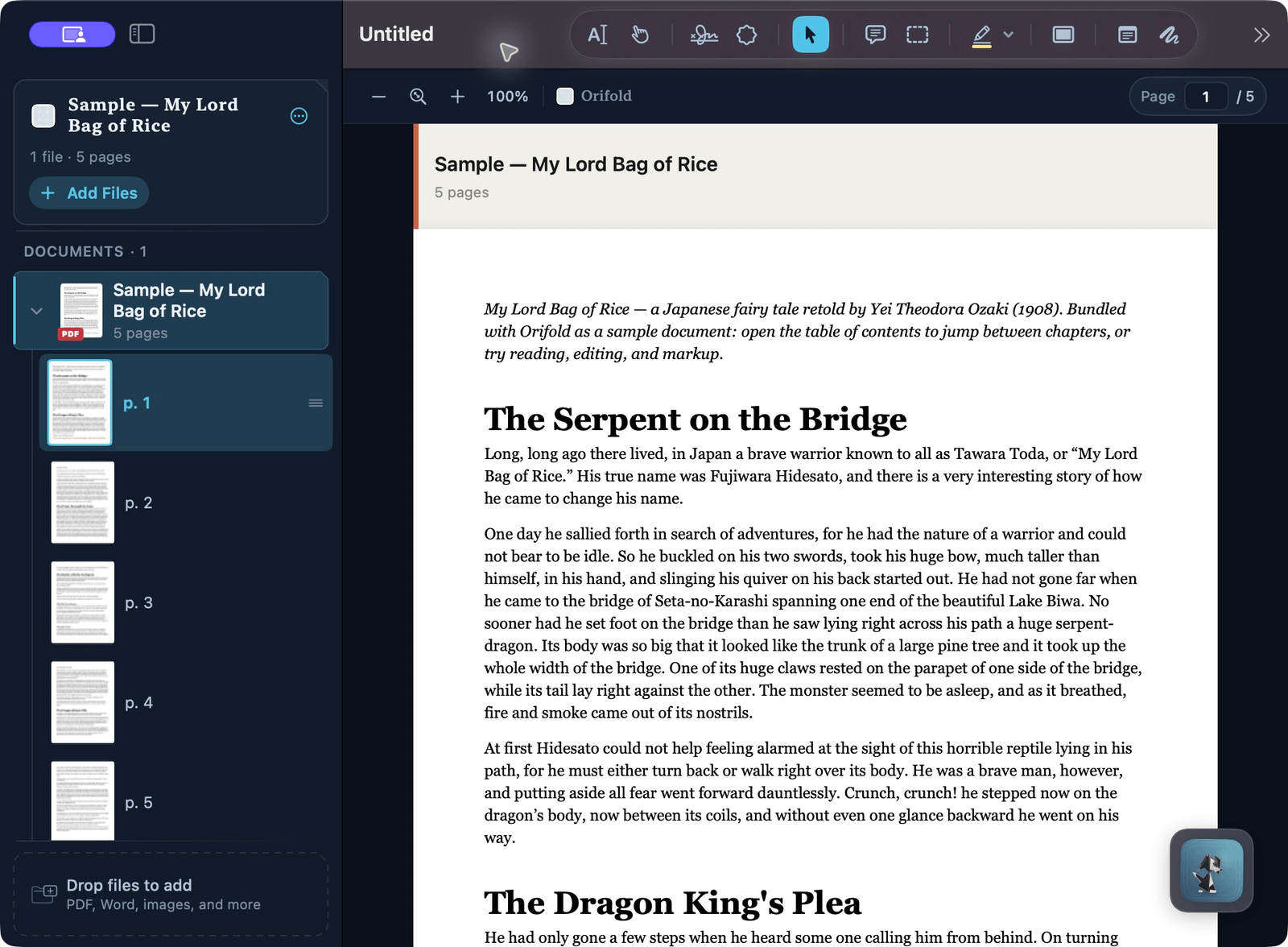
The Orifold workspace: a document sidebar on the left, a PDF open on the canvas, a floating markup toolbar across the top, and the paper companion resting in the corner.
Real capture — Orifold v0.8.14. Sidebar, canvas, markup toolbar — and a paper companion keeping an eye on things.

The quiet promise

Your document stays yours.

No account to create. No cloud to trust. No subscription waiting at the end of the workflow.

No account: nothing to sign up for. No upload: every merge, OCR pass, and export stays on-device with zero telemetry. No subscription: Orifold is free and open source under Apache 2.0.
No account

Nothing to sign up for. Open the app and drop files in.

No upload

Every merge, OCR pass, and export stays on your Mac.

No subscription

Free and open source. Apache 2.0.


First fold · Gather

Fifty messy files. One quiet stack.

A "simple PDF task" is rarely one file. It's six PDFs, two screenshots, a Word document, a scan, and one determined file named final_final_revised_ACTUAL.pdf. Drag the whole pile in — Orifold repairs broken files on the way and stacks them into one workspace.

Orifold's import screen, mid drag-and-drop, with a file about to drop into the 'Release to import files' zone and Gami greeting in the corner.
Real capture — Orifold v0.8.14. Drag anything in; broken PDFs are repaired on the way.

Bring the whole messy pile. I'll keep it straight.


Second fold · Shape

Edit the page itself.

Click the text and fix the typo. Orifold edits the real glyph geometry — not a sticky note floating over a picture of the page. Then protect with AES-256, compress, or sanitize, and export one clean file.

NewObject editing · in beta

BetaEditing is solid on everyday text, and still learning how weird a PDF can get. Spot something off? Send feedback.

A floating text-formatting toolbar — font, size, style, alignment, color, Match/Copy/Paste/Reset — hovering directly over a real PDF page mid-edit.
Real capture — Orifold v0.8.14. The format toolbar appears right where you click.

Signatures are Ori's craft. Over to her.


Third fold · Seal

A signature that holds up.

A drawn mark is a picture. A digital signature is math — a tamper-evident seal over the exact bytes you signed. Orifold produces standards-based PAdES signatures with Keychain and .p12 identities, verifiable anywhere PAdES is understood. How signing works

Real cryptography. Not a picture of ink.

The Signatures panel with Digital selected, a self-signed identity chosen, and a live cursive signature preview reading 'Umang D.' with a 'Signed: Jul 7, 2026 at 9:12 PM' timestamp below, before Sign & Export.
Real capture — Orifold v0.8.14. PAdES signing, right where you're already working.

Fourth fold · Keep

The studio has no windows.

Everything happens on your Mac. The cloud was not consulted.

The Export dialog with Protect with password, Reduce file size, and Sanitize for sharing options, ready before export.
Real capture — Orifold v0.8.14. Sanitize strips what you didn't mean to share.
0The app asks the network for nothing.
AES-256Real encryption, not a "protected" flag a reader can ignore.
SanitizeA file that carries nothing you didn't intend to send.
752tests gate every release.
Apache 2.0Free forever, open source.
6languages, everything on-device.

This page asks GitHub for the latest version number so the button below is always current. The app never does.

Don't trust me. Read the source. I did.

Ma — the marginThe margin

Why it folds this way.

Basic file work on a Mac shouldn't require a subscription, an upload, or a small ceremony. Preview is excellent until the job gets complicated; the more capable tools rent your own files back to you. So Orifold is the workspace I wanted: native, local, and free — where merging, editing, signing, and protecting a document are one calm sequence, not six errands across five apps. Still a beta, built in the open, one honest fold at a time.

Gami

A calm paper Bernedoodle — your everyday guide. Shows up when something needs you, then folds back into the corner.

Ori

A clever paper Siberian — precise and a touch bossy. She keeps an eye on the technical corners: signing, privacy, the fine print.

Orifold takes the shorter path from scattered files to one finished PDF Three clearly separated panels compare the usual PDF detour, Orifold's private native workspace, and the polished result. Animated documents move through an origami crane without uploads, subscriptions, or app hopping. WHY ORIFOLD FEELS DIFFERENT A shorter path from scattered to polished. The market adds gates. Orifold folds the whole job into one private Mac workspace. NATIVE · PRIVATE · FREE 0 UPLOADS 1 WORKSPACE $0 FOREVER NATIVE macOS PRIVATE BY DEFAULT · OPEN SOURCE
Orifold skips the PDF market's upload, subscription, and app-hopping detour Scattered documents move through one native, on-device Orifold workspace and become one polished PDF, with zero uploads and no subscription. PDF TOOLS TAKE THE LONG WAY Orifold folds it shorter. No upload wait. No paywall. No app relay. THE DETOUR UPLOAD PAYWALL APP-HOP SKIP EVERY GATE BELOW ONE NATIVE WORKSPACE OCR EDIT SIGN PROTECT SCATTERED FILES → ONE PDF 0 UPLOADS 1 WORKSPACE $0 FOREVER NATIVE macOS ON-DEVICE OPEN SOURCE
The market adds gates. Orifold removes them — one native, on-device workspace from scattered files to a finished PDF.

Still folding · The horizon

The crane keeps folding.

Orifold is genuinely useful today — and nowhere near finished. Object editing just landed (in beta); a few more folds are taking shape on the workbench. A friendly sneak peek, not a blood oath.

Real redaction

Secrets that actually leave the file — not a polite black rectangle you can drag right off.

Fold the whole stack

Compress, OCR, or watermark a whole folder in one pass — not open, save, repeat, fifty times over.

Side-by-side compare

Two drafts, one screen. Spot the change without printing both and playing spot-the-difference.

Big docs, quick feet

Three-hundred-page beasts that scroll like pamphlets.

More languages

Six today, more in night school — the interface and the OCR that reads your scans.

A calmer first launch

Zero security theater on first open — pending one very official Apple handshake.

Built part-time, in the open — so the order may shuffle and a fold or two may take the scenic route. The direction holds: more useful, more polished, more delightful. Got a fold you'd love to see? Tell us.


Kept current · The quiet fold

It tells you.
You decide.

Orifold watches for new versions and lets you know — then waits for your say-so. When you're ready it can download the next version and check it against the published checksum, right inside the app. Nothing downloads or installs on its own, and the only thing it ever asks the network is "is there a newer version?"

You'll always know

Pick Check for Updates… from the Orifold menu whenever you like. A calm, native dialog tells you if you're current or a newer fold is out — plain language, never a cryptic error code.

Never behind your back

Automatic checks are off by default, and even switched on they only ever check — about once a day. Downloading and installing happen solely when you choose, and any open work is saved first. Nothing is silent.

One quiet question

A check is a single outbound request for the latest version number. Nothing about you, and nothing about your documents, is ever sent. The rest of the app stays fully offline.

When a new version is out, updating is one calm step — let Orifold download and verify it for you, or drag in the fresh copy, re-run the installer, orbrew upgrade. Every release brings real fixes and new folds, written up in plain English.

How updating works · See what's new


Final fold · Take flight

Take it home.

Download for MacmacOS 14+ · v0.8.14 · 22 MB

.dmg · v0.8.1422 MBUniversalmacOS 14+

One universal app — it runs natively on Apple Silicon and Intel, on any Mac with macOS 14 Sonoma or newer.

One-time thing. Two seconds. Here's how —

Orifold is free and open source, so builds aren't notarized by Apple yet. One-time first launch:

macOS 14: right-click Orifold → Open → Open.

macOS 15: open Orifold once (it's blocked), then System Settings → Privacy & Security → Open Anyway → password.

Prefer zero dialogs? Install with Homebrew below — it handles Gatekeeper for you.

Other ways to install
brew install --cask orifold

Or the direct .zip. All releases

Build it yourself

git clone https://github.com/udhawan97/Orifold.git
cd Orifold
./scripts/install-mac.command

Doubt me? Build it yourself.


Today's fold

One sheet, folded with stubborn optimism.