
Sign documents
You need to sign a PDF and send back a finished copy — either a quick visual mark or a verifiable digital signature.
Orifold has two kinds of signing, and they answer different needs. Open the Signatures palette and pick the method that matches what your recipient actually requires.
Which one do I need?
Section titled “Which one do I need?”| Visual signature | Digital signature | |
|---|---|---|
| Palette methods | Draw · Type · Initials | Digital |
| What it is | A picture of your signature placed on the page | A cryptographic signature bound to the file with a certificate |
| Proves the file is unchanged? | No | Yes — any edit after signing breaks it |
| Proves who signed? | No | Yes, if the certificate is trusted |
| Good for | Approvals, internal forms, “sign here” lines | Contracts, filings, anything requiring verification |

Pick deliberately. A drawn mark is a picture; a digital signature is math. Sending the first where the second is required is the most common signing mistake.
Add a visual signature (Draw, Type, or Initials)
Section titled “Add a visual signature (Draw, Type, or Initials)”- Open the Signatures palette from the annotation toolbar.
- Choose Draw (trackpad or cursor), Type (styled from your name), or Initials.
- Place the mark on the page and resize it as needed.
- Export the signed PDF.
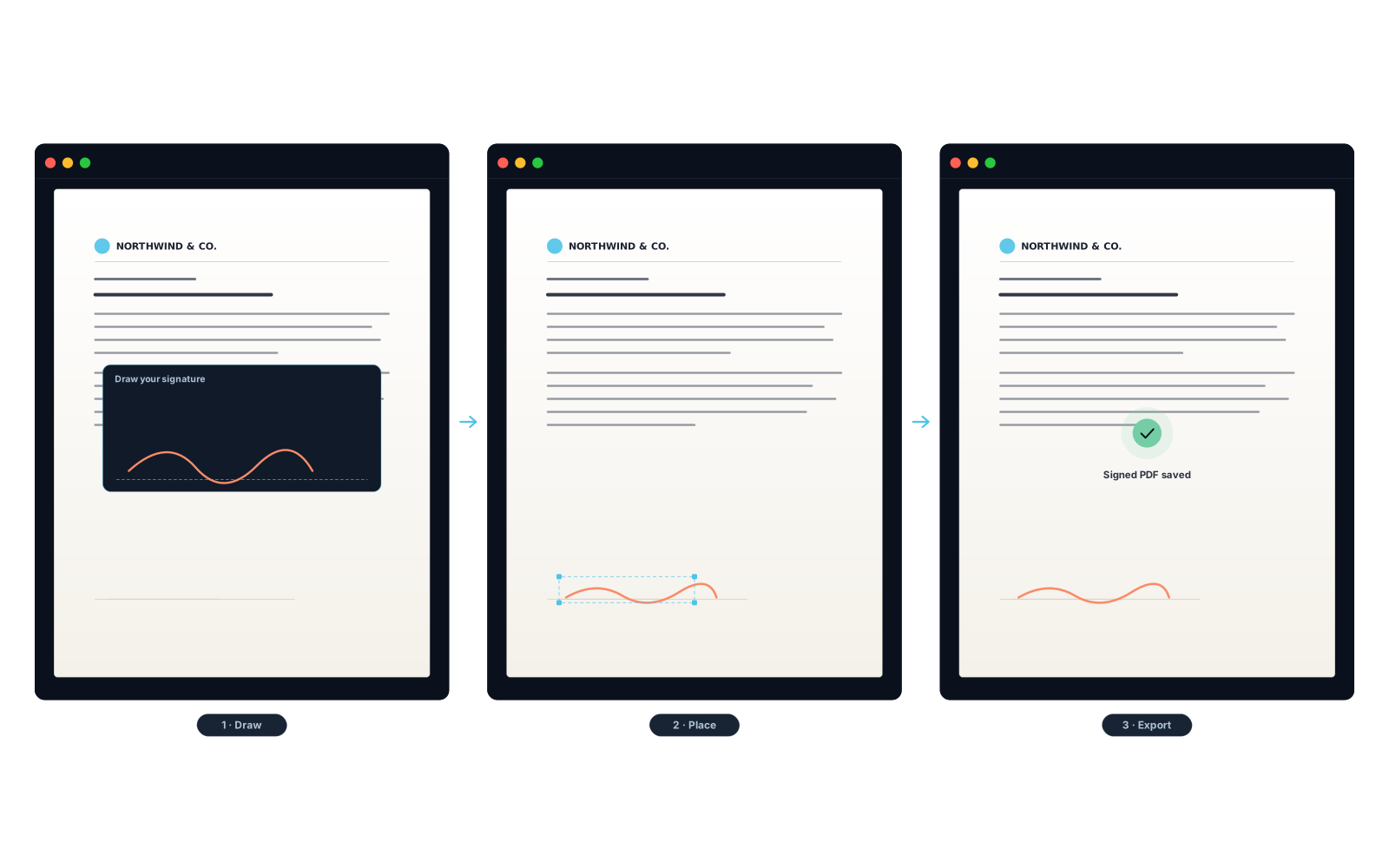
No e-sign service, no upload — your mark is drawn and placed entirely on your Mac and never touches a server.
A drawn, typed, or initialed mark is a visual signature — a picture on the page. It doesn’t cryptographically prove who signed or that the file is unchanged. When that proof matters, use a digital signature below.
Apply a digital signature
Section titled “Apply a digital signature”A digital signature binds a cryptographic proof to the file using a Digital ID (a certificate + private key). Orifold produces a standards-based PAdES B-B signature entirely on your Mac. The optional timestamp setting is the one signing step that goes online: Orifold sends a SHA-256 hash of the signature bytes — never your document — to the chosen timestamp authority and requests a candidate token. Current builds do not embed or mark that token because full CMS/PKI trust validation is not yet available.
- Open the Signatures palette and choose Digital.
- Provide a Digital ID:
- Import .p12 / CA-issued Digital ID — a certificate file you already have.
- Choose Keychain Digital ID — an identity already in your macOS Keychain.
- Generate self-signed ID — created on the spot, no cost (see the caveat below).
- Optionally enable a timestamp request (requires an internet connection and sends only a hash of the signature bytes to the selected timestamp authority). Current builds warn and export PAdES B-B without a timestamp after requesting the candidate token.
- Click Sign & Export… and choose where to save.
The Digital palette keeps the identity source, timestamp provider, appearance preview, and Sign & Export… action together. Review the displayed identity and signing-time choice before exporting; do not treat the preview alone as proof that a recipient will trust the certificate.
Self-signed IDs show as “identity not verified” in other viewers. The signature is cryptographically valid and the document is fully protected, but because no certificate authority vouches for a self-signed ID, viewers like Adobe Acrobat report “the signer’s identity is unknown” until you (or your recipient) manually trust it. For signatures others must verify automatically, use a CA-issued Digital ID. See Getting a Digital ID in the palette.
What Orifold produces, technically
Orifold writes an append-only incremental update with a detached CMS signature over a correct ByteRange — the original bytes are never rewritten, so a valid signature means the whole document is intact.
- Standard: PAdES (
ETSI.CAdES.detached), SHA-256. - With a timestamp requested: a candidate RFC-3161 token is requested from a TSA (a free default, or your chosen provider), but current builds do not embed or mark it until full CMS signature, TSA certificate/EKU, and certificate-chain trust validation exists. Export warns and continues as PAdES B-B without a timestamp.
- Verified with:
pdfsig(poppler) andopenssl asn1parsereport Signature is Valid and Total document signed. - Out of scope today: long-term validation (LTV / OCSP / CRL embedding).
For the engineering detail, see the Developer FAQ and the engines.
What you should see
Section titled “What you should see”A visual mark appears exactly where you placed it and travels with the exported PDF. A digital signature produces a signed file that verifies as intact in any PAdES-aware viewer — with a trusted-identity indicator if your Digital ID is CA-issued.