
Meet Gami & Ori
Orifold ships with an optional companion that offers short, useful hints for the moments that matter — exporting, saving, and anything that needs your attention. It stays out of your way: a quiet chip in the corner, never on top of your page.

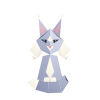
Gami here. I’m optional — helpful when you’re new, one click to quiet when you’re not. Pick whichever of us you like on first launch.
Two very different personalities
Section titled “Two very different personalities”Choose on first launch, and switch anytime from the app menu or the companion’s popover:
- Gami (an origami Bernedoodle) is warm, playful, and encouraging. He moves toward you: “Exporting? I can walk you through the options.”
- Ori (an origami Siberian) is curious, clever, and charmingly bossy. She lets you come to her: “Gami would chase the cursor. I prefer strategy.”
The origami detail: both are folded paper with real depth
Gami has floppy black ears, a cream blaze and chest, and a calm wag; Ori has a plush cream ruff, tufted lynx-tip ears, and a long tail that wraps composedly around her paws. They’re siblings folded from the same sheet of paper — different mothers’ patterns, same origami. On first launch your companion shows off at full size for a few seconds so you can watch the fold before it settles into its corner; hover it any time afterward to bring that detail back. Reduce Motion skips the showcase and keeps the companion at its resting size throughout.
What they help with
Section titled “What they help with”Gami and Ori speak up for hero moments — exporting, saving, first-time use of a feature, and warnings — rather than narrating every click. The rest of the time they just pulse quietly to acknowledge what you did, so the tips stay occasional instead of chatty. Ori also waits a little longer than Gami before a hover tip appears — she notices you before she speaks.
Switching companions
Section titled “Switching companions”If you haven’t discovered the popover on your own by your third session, a small one-time card near the chip introduces both companions and points at the switcher — “Gami keeps things playful. Ori supervises with taste.” It shows at most once: opening the popover or switching species yourself retires it immediately, and dismissing it retires it too.
Quieting the tips, or turning them off entirely
Section titled “Quieting the tips, or turning them off entirely”Click the companion chip to open its popover:
- Hide Gami Tips — keeps the companion visible but stops hint bubbles; useful if you’d rather explore on your own.
- Show Orifold Buddy (app menu) — hides the companion entirely. Everything else in Orifold works exactly the same either way.
Charming when you want it, quiet when you don’t — both toggles are one click, no questions asked.